

- Katılım
- 23 Eki 2022
- Mesajlar
- 8,639
- Çözümler
- 12
- Tepkime puanı
- 6,086
- Puanları
- 113
- Yaş
- 28
Upgrade your server's gear progression with this massive Modified Beta Armor Set! This collection features 5 unique color variations for each class, providing you with high-quality, professional assets that are perfect for personalizing your server's evolution lines.
Originally crafted by [Rias], these modified armors breathe new life into the classic Beta designs. Whether you are aiming to create diverse factions, color-coded elite tiers, or unique reward sets for your events, this pack delivers the visual variety you need to make your server stand out.
What is included in this Modified Beta pack:
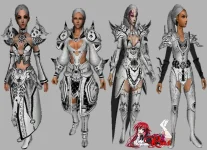
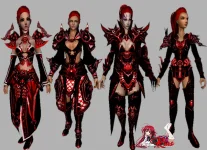
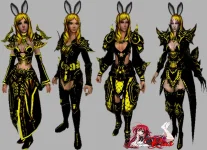
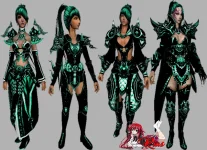
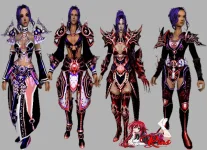
Originally crafted by [Rias], these modified armors breathe new life into the classic Beta designs. Whether you are aiming to create diverse factions, color-coded elite tiers, or unique reward sets for your events, this pack delivers the visual variety you need to make your server stand out.
What is included in this Modified Beta pack:
- 5 Distinct Color Variants: Includes 5 custom-textured versions of the classic Beta armor, offering a wide palette to fit any server theme.
- Full Class Support: Ready-to-use .gr2 models and high-resolution .dds textures for all character classes (Warrior, Ninja, Sura, Shaman, and Lycan).
- Ready for "Perso" Usage: These sets were curated to be perfect for "personal" server implementation, allowing for quick and clean integration into your item progression systems.
- Visual Flexibility: With 5 different color schemes, you can easily create meaningful gear distinctions (e.g., set A for PvP, set B for PvE, or tiered upgrades).
- Modernized Classics: Retains the familiar, beloved silhouette of the standard Beta armor while offering a fresh, "custom" look that feels premium.
- Performance Optimized: These assets are balanced to provide a high-end visual upgrade without impacting your client's stability or performance.
- Extract the "5 Color Modified Beta Armor Set" archive.
- Port the .gr2 and .dds files into your client's ymir work/pc/ directories for each class.
- Import the 5 corresponding icon sets into your icon/item folder.
- Update your item_proto and item_list to register each of the 5 color variants as individual items.
- Merge the provided MSM configuration lines to ensure the models render correctly for all character classes.
- Launch your client and introduce these 5 new elite tiers to your community!
İçeriği görüntülemek için Giriş yapın veya Kayıt olun.
